
Messenger: Messages SMS App
J K AppsCommunication
4.370.00 Reviews
- Version
- 0.0.15
- Installs
- 1.00M
- Age Rating
- Everyone
Screenshots
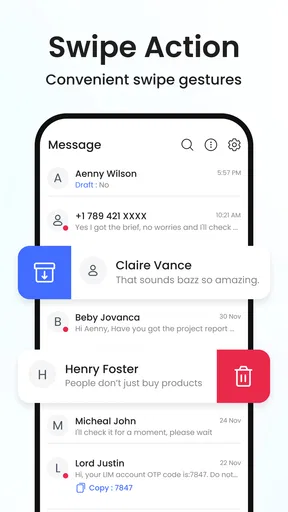
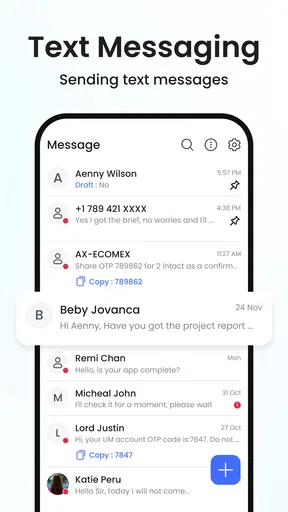
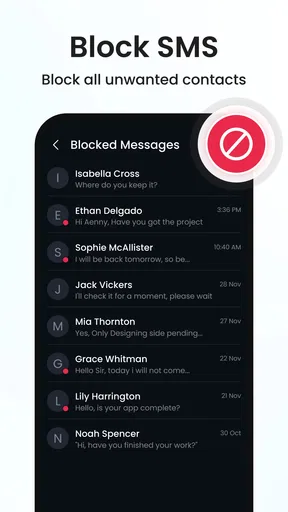
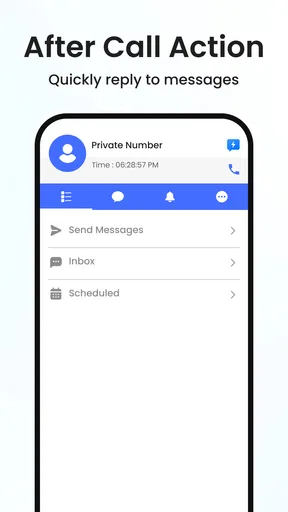
Our Review of Messenger: Messages SMS App
 Analysis by Appyee
When I want to send a straightforward text without opening a social network, I look for an app that stays out of the way. Messenger: Messages SMS App is built around that simple need. It is a free communication app from J K Apps, aimed at everyday SMS conversations rather than a large ecosystem of calls, channels, stickers, or social feeds. After using it as a practical messaging tool, I found its appeal easy to understand: it focuses on writing, receiving, blocking, and scheduling messages in one uncomplicated place.
That narrow focus is also the key to deciding whether it belongs on your phone. If you mainly need ordinary text messaging and want a cleaner alternative to a crowded default inbox, it is worth considering. If your conversations depend on encrypted internet chat, group collaboration, media sharing, or cross-platform features, a more established chat service will probably suit you better. My experience with this app is best described as useful and direct, with a few limitations that become more noticeable once your messaging habits grow beyond basic SMS.
A practical starting point for ordinary texting
The app sits in the communication category and is available free of charge. Its age rating is Everyone, which fits the straightforward nature of the product. The current release is version 0.0.15, and the app requires Android 11 or later. That last point matters before installation: an older Android phone may be perfectly capable of sending texts but still be unable to run this particular app.
Its public reception is encouraging without suggesting that it has replaced every major messaging platform. It holds a 4.3 average from around 2.6 thousand ratings and has passed one million installs. I read that as a sign that the basic idea works for a meaningful audience, while also remembering that a rating cannot tell me whether the app fits my own phone, carrier, contacts, or texting habits.
My first useful test was not an elaborate conversation. I started with the situation most people actually face: a family member needed a quick update, I had to send a short appointment reminder, and I wanted to avoid digging through a social app to find the right thread. The value here comes from reducing the number of decisions between opening the app and sending the message.
From opening the inbox to sending a message
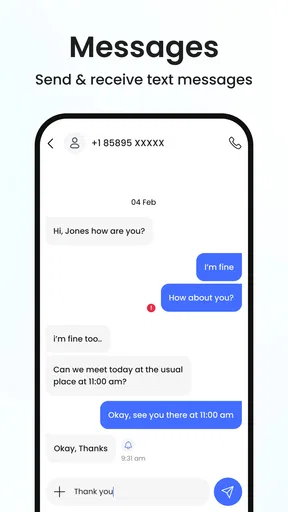
The normal workflow is familiar. I open the app, find the conversation, write the text, and send it. That may sound too ordinary to review, but ordinary is exactly where an SMS app succeeds or fails. A messaging screen needs to make the current thread obvious, keep incoming and outgoing texts readable, and avoid turning a two-line exchange into a hunt through unrelated features.
For a short message, this app feels most appropriate when the recipient is already part of my usual phone contacts. I do not need to persuade that person to install the same service, create an account, or check whether they are online. The handoff is the phone number and the carrier network, not a separate community. That makes it useful for relatives, service providers, schools, and other people who may not share my preferred chat platform.
There is an important distinction here. This is an SMS-focused tool, not automatically a replacement for every internet messenger. A text sent through a carrier behaves differently from a message sent through an account-based chat service. Delivery, cost, group behavior, media handling, and international use can depend on the phone plan and network involved. I would therefore treat the app as a front end for conventional texting, not as a promise that every modern chat feature will work in the same way.
A good habit is to use the first few conversations as a compatibility check. I would send a normal text to someone who can reply quickly, then confirm that incoming replies appear in the same thread and that notifications behave as expected. This small test is more useful than assuming that all SMS applications handle every device and carrier combination identically.
Scheduling turns a message into a small workflow
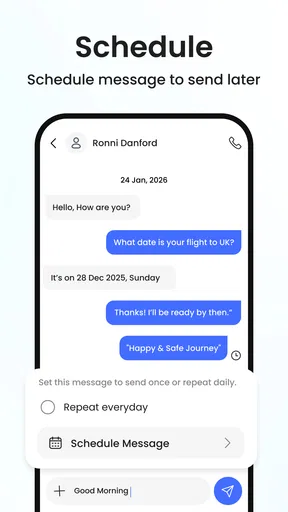
The scheduling option is the feature that gives this app more practical value than a minimal inbox replacement. Instead of relying on memory, I can prepare a message for a later time. That is useful for a reminder, a birthday greeting, a morning instruction, or a follow-up that should not be sent immediately. It changes the task from “remember to text later” into “prepare the text now and let the app handle the timing.”
I find this especially helpful when the content is simple but the timing matters. For example, I might write a reminder for a family member before an appointment, schedule a note about collecting something after work, or prepare a message while the details are fresh in my mind rather than trusting myself to recreate them later. The benefit is not automation for its own sake; it is removing a small mental burden from a busy day.
There is a trade-off. A scheduled message should be treated as a planned action, not as a guarantee that circumstances will remain unchanged. If the appointment moves, the recipient replies early, or the wording becomes outdated, I need to revisit the scheduled item rather than forgetting it. My practical tip is to schedule messages only when the text is unlikely to need a last-minute correction. For changing plans, a reminder to compose the message later may be safer than sending an automatic message based on old information.
Scheduling also creates a useful handoff between the person I am now and the person I will be later. I write the message, choose the intended time, and then rely on the app to carry that instruction forward. That makes accuracy important: I would reread the recipient and wording before confirming, especially when several contacts have similar names. A mistake in a scheduled text can sit unnoticed until it is too late to prevent the send.
Blocking helps separate useful conversations from unwanted ones
Blocking is the other feature that changes the daily workflow. When a number repeatedly sends unwanted texts, I do not want to keep treating every new message as another item requiring attention. A block option gives me a direct way to reduce that interruption inside the messaging experience.
I see this as a practical inbox-management tool rather than a complete answer to every form of abuse or spam. It can help with a nuisance contact, but it does not make the broader SMS system private or transform a carrier message into an encrypted conversation. I would still be careful with suspicious links, unexpected requests, and messages asking for personal or financial information. Blocking a number is useful after a problem appears; it is not a substitute for judging the message itself.
There is also a human consideration. Blocking is easy to use as a quick reaction, but it can be inconvenient if the number belongs to a delivery service, temporary workplace contact, or someone who changes numbers. Before blocking, I would check the conversation and contact details. If the unwanted message is clearly persistent, the action is sensible. If it is merely unfamiliar, deleting or ignoring it may avoid cutting off a legitimate sender.
Where the handoffs feel smooth
The strongest part of the experience is the handoff between my intention and the recipient’s phone. I can write a normal text without asking the other person to join the same platform. That is the central advantage over account-based alternatives such as internet messengers: the recipient does not need to install this app to receive a conventional SMS.
This makes the app a reasonable choice for a household with mixed preferences. One person may use an Android phone, another may prefer a different messaging service, and a third may avoid installing new apps altogether. For a short practical exchange, SMS remains the common denominator. Messenger: Messages SMS App keeps its attention on that exchange instead of trying to turn it into a broader social experience.
The handoff is less attractive when a conversation becomes media-heavy or collaborative. If I need rich reactions, large files, live location, voice notes, searchable shared content, or a conversation that works primarily over the internet, I would look at a dedicated chat platform instead. Those services usually provide a more complete shared environment because both sides use the same system. This app’s simplicity is an advantage only while the task remains a text message.
Group conversations are another point where expectations should stay realistic. Basic texting can be enough for a small practical update, but groups often expose the limits of carrier-based messaging and device-specific behavior. I would choose this app for a simple group notice only after confirming that the people involved receive and reply to the thread correctly. For ongoing group planning, a purpose-built group messenger is usually the less frustrating option.
A realistic day-to-day result
Imagine a weekday in which I need to send three different kinds of messages. In the morning, I schedule a reminder for a family member. At midday, I receive an unexpected text from a number that has sent several unwanted offers, so I block it after checking the thread. Later, I send a normal SMS to a repair service that does not use my preferred chat app. These tasks are unrelated, but the app handles them through the same basic communication path.
The result is not dramatic, and that is part of its usefulness. I finish the tasks without maintaining another social profile or asking each recipient to move to a different platform. The scheduled message reduces the chance that I forget, the blocked number reduces a recurring distraction, and the ordinary text reaches a contact who only needs a simple reply. For this kind of day, the app earns its place through small conveniences rather than a long feature list.
I also appreciate that the workflow is easy to explain to another person. If I recommend it to a friend who wants a simpler SMS experience, I can describe the core actions in plain language: use it for regular texts, schedule messages when timing matters, and block conversations that should not keep appearing. That clarity is more valuable to me than having numerous tools I would rarely touch.
Where the workflow breaks down
The first friction point is the Android requirement. Because the app needs Android 11 or later, it is not a universal option for older devices. Someone using an aging phone may need to stay with the built-in messaging app or choose another compatible alternative. I would check the operating system before spending time moving contacts or changing the default SMS setup.
The second issue is the difference between a clean SMS interface and a modern messaging platform. This app is not the right choice if I expect every conversation to provide internet delivery, strong encryption, rich media tools, or a seamless experience across several device types. Its category and purpose are narrower. Choosing it for those broader needs would create disappointment that is really a mismatch of expectations.
Another possible source of friction is changing the app that handles messages. On Android, the default SMS application can affect where new texts appear and which app opens when I tap a message notification. I would make the switch deliberately, test an incoming message, and keep the previous setup in mind until I know the new workflow is reliable. This is particularly important for people who depend on text alerts from services, workplaces, or family members.
Scheduling can also break down when plans change quickly. A scheduled reminder is helpful only if I remember to review or cancel it when the situation changes. I would avoid scheduling sensitive or time-critical instructions without a backup plan. A normal immediate text is better when the recipient needs an answer now, and a calendar or task app may be better when the reminder is for me rather than for another person.
Blocking has its own boundary. It can make the inbox calmer, but I would not assume that blocking one number solves every unwanted-message problem. Senders can use different numbers, and suspicious texts still deserve caution. The feature is best viewed as a focused control for a conversation, not a complete spam-protection system.
How it compares with the usual alternatives
Compared with the phone’s built-in SMS app, the main reason to choose this one is the combination of scheduling and blocking in a focused interface. If the default app already handles those tasks well and I am comfortable using it, switching may not offer enough benefit to justify changing a familiar workflow. The advantage becomes clearer for someone who specifically wants those controls gathered in one simpler messaging tool.
Compared with internet messengers, this app wins on reach. I can text people who do not share an account or app with me. The alternatives usually win on richer conversations, internet-based delivery, multimedia communication, group tools, and features designed around an ongoing online identity. I would use this app when the recipient’s phone number is the most reliable connection, and another messenger when both sides already live in the same online service.
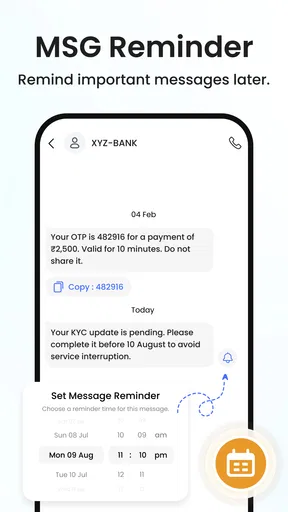
Compared with a full productivity or reminder app, its scheduled messages have a different purpose. They send information to another person rather than merely reminding me to act. That distinction is easy to miss. If I need to remember to call someone, I want a task or calendar reminder. If I already know what I want to tell them and simply need the message to go later, this app’s scheduling workflow makes more sense.
Who I would recommend it to
I would recommend Messenger: Messages SMS App to someone who wants a focused SMS experience, uses a recent Android phone, and values the ability to schedule texts or block unwanted conversations. It is also a sensible option for people who regularly communicate with contacts who do not use the same internet messenger. The free price lowers the barrier to trying it, and the Everyone rating makes its intended audience broad.
I would be more cautious about recommending it to someone who depends on advanced group chats, frequent photo and video sharing, encrypted conversations, or a messaging service that works equally across different operating systems and devices. That person is likely to feel constrained by an SMS-centered workflow. I would also hesitate for anyone using an Android version below the required minimum, since compatibility comes before convenience.
For families, one useful approach is to test it with a small number of routine conversations before making it the main SMS application. Try an incoming reply, a scheduled reminder, and the blocking control. This reveals whether the app fits the way the household actually communicates. It also prevents a rushed change from interfering with important text notifications.
My final take after following the full workflow
Messenger: Messages SMS App succeeds when the starting condition is simple: I need to send or receive ordinary texts and want a little more control over timing and unwanted contacts. The flow from composing to sending is familiar, the handoff to people outside my preferred app is convenient, and the result is a quieter, more organized SMS routine.
Its limitations are equally clear. It does not replace the broader experience of a modern internet messenger, and scheduling still requires human judgment when plans change. The Android 11 requirement narrows compatibility, while carrier-based texting retains the practical constraints of SMS. Those are not flaws I would ignore, but they are easy to understand before committing to the app.
With over one million installs and a 4.3 average, it has found a substantial audience for this focused approach. I would choose it for dependable everyday texting with scheduling and blocking, not because it tries to do everything. Its best quality is the way it turns a basic SMS inbox into a more deliberate workflow without making ordinary messages feel complicated. For readers who want exactly that, the free app from J K Apps is a practical choice; for readers seeking a complete online chat platform, I would recommend looking elsewhere.
Verdict
Strengths of Messenger: Messages SMS App
- Simple interface makes texting and calling easy for most users.
- Supports group chats for coordinating with friends, family, or coworkers.
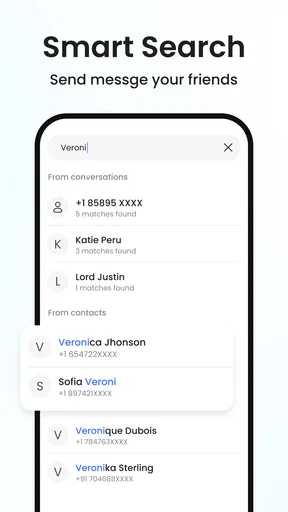
- Message search helps locate older conversations quickly.
- Voice and video calls are convenient for staying in touch remotely.
- Contact syncing makes it easy to find people already in your address book.
Limitations of Messenger: Messages SMS App
- Requires an internet connection for most features beyond basic SMS.
- Frequent notifications can become distracting in busy conversations.
- Some advanced features may vary by device, carrier, or region.
- Large group chats can quickly become difficult to organize.
- Privacy settings may take time to understand and configure properly.
Similar Picks in This Category
View All
Google Messages
Google LLC4.6

Gmail
Google LLC4.1

Google Meet
Google LLC4.4

Google Chrome
Google LLC4.1

WhatsApp Messenger
WhatsApp LLC4.6

Carrier Services
Google LLC4.2
Frequently Asked Questions
What is Messenger: Messages SMS App used for?
Messenger: Messages SMS App is designed for sending and receiving traditional text messages and multimedia messages through your mobile carrier. Depending on the device and version, it may let you manage conversations, send photos or videos, use emojis, search message history, block unwanted contacts, and organize your inbox. It is primarily an SMS and MMS tool, not necessarily the same as internet-based services such as Facebook Messenger or WhatsApp.
Does Messenger: Messages SMS App require an internet connection?
An internet connection is generally not required to send standard SMS messages because they use your carrier’s mobile network. However, MMS messages, such as photos, videos, or group messages, may require mobile data and proper carrier settings. Some versions can also include optional online features, advertising, backups, or media downloads that work better with Wi-Fi. Carrier charges may apply even when the app itself is free.
Is Messenger: Messages SMS App free to download and use?
The application may be available as a free download, but sending messages is usually subject to your mobile provider’s plan. SMS and MMS costs depend on your carrier, contract, location, and whether you have an unlimited messaging allowance. Some versions may include advertisements, optional purchases, or premium features. Before using it regularly, check both the app’s store listing and your carrier’s messaging rates.
Can I use Messenger: Messages SMS App on any Android or iPhone?
Compatibility depends on the exact app developer, operating system version, and device model. Many SMS applications are intended mainly for Android because iOS restricts third-party apps from replacing Apple’s default Messages app and accessing SMS functions in the same way. Review the official store listing for supported versions, permissions, and regional availability. Installation alone does not guarantee that every feature will work on your phone.
Is my personal information safe when using Messenger: Messages SMS App?
Privacy depends on the app’s developer, permissions, advertising partners, and the way messages are stored or processed. An SMS app may request access to contacts, notifications, phone functions, storage, and messages in order to provide its core features. Before installing, read the privacy policy and avoid granting permissions that seem unnecessary. Remember that ordinary SMS messages are generally not end-to-end encrypted, so sensitive information should be shared carefully.
